
Ecommerce SEO Strategy Guide: Rank, Convert, and Retain
 Updated on November 18, 2026

Ecommerce SEO is the work of getting your store’s category, product and content pages to rank in Google, so shoppers find you without paying for every click. This guide gives you a practical ecommerce SEO strategy for technical fixes, page optimization and content, plus the traffic checks buyers run when Empire Flippers, which has sold 2,688 online businesses, lists a store for sale.
E-commerce SEO can help those who are looking to move into the number one position for their desired keyword by focusing on building content related to what your audience is searching for. Paid advertising on Google might give you some recognition at the top of the SERP, but spending money to gain this traffic doesn’t offer much in terms of stability.
The first step for e-commerce brands and direct-to-consumer (DTC) sellers alike is to build a presence with your own website. In doing so, you are given the runway to reach your target audience without any outside factors disturbing your audience’s journey through your sales funnel. Sure, there are tons of e-commerce businesses doing great selling on Amazon, eBay, and Etsy, but when you use these platforms alone, you are leaving behind all the added benefits of building direct organic traffic for your products. You can gain organic traffic on Amazon, and many sellers have great success doing so, but we will primarily focus on building SEO content for DTC and e-commerce store owners in this guide.
After you have your e-commerce store setup, whether it uses WordPress and the WooCommerce plugin, a Shopify storefront, or a personalized shopping cart experience on your own branded domain site, you can begin the process of building your SEO content to gain organic traffic.
What Ecommerce SEO Means in 2026
Ecommerce SEO covers three jobs: making sure search engines can crawl and index your store, matching each page to what shoppers search for, and earning links and mentions that build trust. Category and product pages carry most of the revenue, so they come first. Blog content supports them by answering questions earlier in the buying process.
SEO still matters because organic traffic does not stop when the ad budget does. Paid ads need constant spend to keep returning sales, while organic rankings need less upkeep once they are in place. It also lowers customer acquisition cost, which is why buyers looking at ecommerce businesses for sale see steady organic traffic as attractive.
Ecommerce SEO Strategy: Start With What Shoppers Search For
Start every ecommerce SEO strategy with the words shoppers type. Give each page one main search term: categories target broad product terms, and product pages target specific models, sizes or uses. When two pages chase the same term they compete with each other, so pick one page as the target and link the other to it.
For any e-commerce business, finding traffic the cheapest way possible is the name of the game. This is why SEO can play an important role in building your brand without spending a ton of money on paid advertising.
When optimized correctly, no matter in which niche you happen to be selling, you can gain the traffic you desire without the added cost per click. SEO-optimized e-commerce websites can benefit from ongoing free traffic with a much higher conversion rate (compared to PPC advertising alone) when you capture your audience’s attention at the right moment of their buying journey. Before you can gain this free organic search traffic on your e-commerce website, you should first understand how to plan your content strategy based on the keywords and long-tail keywords that you will be targeting.
Short-Tail vs Long-Tail Search Terms for Online Stores
Keyword research is at the core of building an optimized SEO strategy for your e-commerce business. Identifying your main seed keywords based on the products you are selling will help you understand which long-tail keywords you might want to try and rank for.
Short-tail keyword example: Stand-up desk
Long-tail keyword example: Best stand-up desk for under $500
As you can see in the example above, the product being sold (stand-up desk) is the seed keyword, and the long-tail keyword has some additional intent. Long-tail keywords will usually be geared toward something specific about the product (best, and under $500 in the example above) and will give you insight into which solution your SEO-driven content should provide your reader.
A few tools and resources you can use to identify long-tail keywords for any type of product you are attempting to rank on Google include:
Ahrefs
SEMrush
Keyword Tool Dominator
Google Keyword Planner
Wikipedia
Amazon suggests
Now, this is not an exhaustive list of all the keyword planning tools available on the market, but these will at least give you a head start in the right direction. We like to use Ahrefs for our content marketing strategy, but you can use just about any of the tools mentioned above. When it comes to locating your target long-tail keywords, it’s best to group your main seed keywords according to their category and intent. Some keywords will have an information search intent, while other keywords will have a buying intent. Group your main seed keywords into their respective categories to have a better idea of how you should plan out your content. Here’s an example:

Once you have started to categorize your main seed keywords, you can start digging deeper into your keyword research to find content ideas related to your products on which to build.
After you have your list of long-tail keywords categorized, you will need to find out what the value of these keywords is for you and your brand. To find this, we like to use Ahrefs as it provides data on how competitive your target keywords are, and suggests other topic ideas for which you might also be able to rank.

Within Ahrefs, you can find tons of information related to your keywords based on several different search criteria. Some of the most important metrics you will want to pay attention to when building your content strategy include the following:
Demand and Difficulty: Pick Terms You Can Win
The search volume for a given keyword or long-tail keyword is based on monthly searches performed for your inquiry within Google. You can partition your search even further based on geographical location and other factors that will help you locate the value a given search term provides to your brand.
On the main dashboard in Ahrefs, you are given a keyword difficulty number, which informs you how difficult it may be to rank for your given search term. This information is valuable for smaller businesses, as it will give you an idea of how competitive your target keyword is compared to other sites currently ranked for the same term.
After you have located your target keywords, you will want to list content ideas based on users’ intent. You can also use Ahrefs to locate similar keywords based on having the same terms and also ranking for other content ideas closely related to your given keyword. After you have all your content topics segmented into clusters based on search intent, you will then start the process of structuring this content to be added to your site. This is an important step in building your e-commerce SEO strategy, so it is best to use the preferred layout that Google favors.
A new store should start with long-tail product terms that have lower difficulty, then move to broader category terms as its links and authority grow. A page that ranks for a narrow term and converts is worth more than a page on page three for a broad one.
Site Architecture: How to Structure Your Store
Your site’s architecture (how you organize your content) is important for all e-commerce sites. This is because most e-commerce brands have thousands of product pages and a bunch of product variations that usually require multiple pages for the same products.
Structure your site’s content in a way that benefits the end-user and allows them to move smoothly through your sales funnel. As an e-commerce site owner, your goal is to ensure that users can quickly identify key pages of content and the relationships between the different pages on your site. It is also worth noting that bad user flow within your site can hurt your SEO rankings. Here’s an example of how your site’s content layout should look:

Here is an example of how your site’s layout should not look:
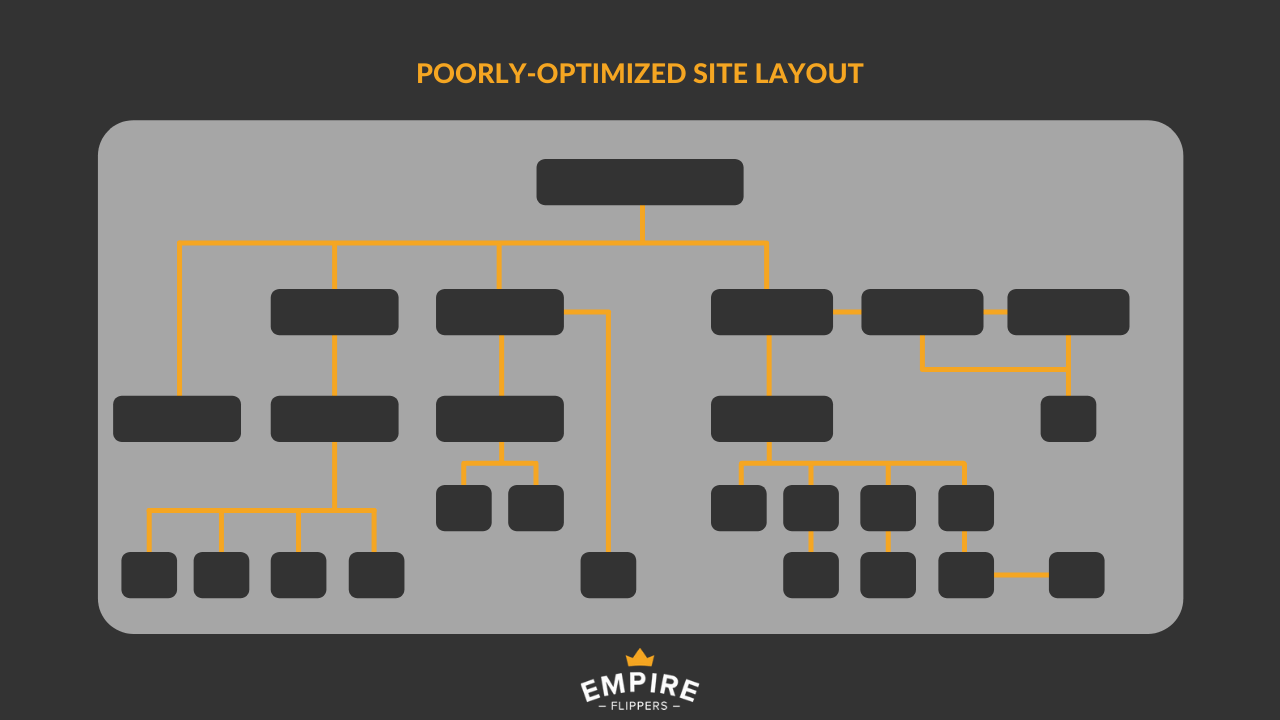
As you can see from the example above, the product pages have been buried by other pages unrelated to the items you are selling. This is something you should try to avoid, as it not only hurts the user experience but also increases the likelihood that the user will bounce from your site. Your main objective should be to make the user flow through the site seamlessly to avoid any sudden drop-offs or loss of interest.
Keep every important category and product page within three clicks of the homepage. Use one simple path, Home > Category > Subcategory > Product, and show the same path as breadcrumbs on each page. Flat, logical navigation helps shoppers find products and helps search engines understand which pages matter most.
Put Yourself in the Shoes of Your Buyer
Before you begin adding pages of content to your website, you should first map out the general structure of how your site will look. A few things you should consider before you begin adding drop-down menus and other site-related navigation bars are to ask yourself the following questions:
- Which search queries do consumers use before they get to your site?
- Which search queries do consumers use once they’re on your site?
- Which pages on your website get the most traffic?
- What are your top-converting pages?
Having this information mapped out before you start structuring the content on your website will help you get a better idea of how you can improve your content flow. By this time, you should also have a clear understanding of what your buyer personas look like. Creating an avatar for your ideal customer allows you to focus on content that is closely related to what your target audience is searching for, and gives you a foundation to help nurture them through your sales funnel.
Technical SEO Checklist for Stores
Technical SEO decides whether search engines can find, render and trust your pages. Page speed matters for both rankings and revenue, but it is only one part. Run this checklist once a quarter and after any theme, app or platform change.
Crawling, Indexing, and Duplicate Pages
- Submit an XML sitemap in Google Search Console and check the Pages report for category and product URLs that are not indexed.
- Set a canonical URL on product variants and on filtered or sorted collection pages, so only one version of each page is indexed.
- Keep internal search results and endless filter combinations out of the index. They create thousands of thin URLs.
- Write a unique description for every product instead of reusing the manufacturer’s text.
- Keep out-of-stock pages live with a link to the closest alternative. Redirect discontinued products to the parent category instead of leaving a 404.
- Add Product structured data (price, availability, rating) and BreadcrumbList markup to your templates.
- Serve every page over HTTPS and test your category, product and checkout templates on a phone.
- Check Search Console for manual actions. A penalty is one of the first things a buyer looks for.
What Slows Down an Online Store
Most slow stores share the same three causes.
Over-stuffed E-commerce Platforms
Some e-commerce platforms are inherently slow due to over-stuffed coding. Unlike a blogging CMS like WordPress, you cannot install a plugin to improve your site speed.
Large Image File Sizes
High-resolution product images are awesome for your customers, but they can make your page load extremely slowly. Keep in mind that if your image files are too large to fit the space provided on your page, the website itself will take more time to properly load the image in its entirety.
Slow Hosting and Servers
When it comes to your web hosting, the saying goes that you often get what you pay for. A slow hosting plan can place extra strain on your site’s maximum speed. You might not notice these negative impacts until it’s too late, but all three of these issues can be addressed with some proper planning. If you do happen to come across these issues when improving your page load speeds, here’s how to fix it:
How to Speed Up Your Store
Fix them in this order, starting with the change that helps every page at once.
Upgrade Your Hosting
We can’t recommend one specific hosting provider because your decision will depend on your preferences and needs (for example, the level of support, pricing, security, etc.). Here is a general guide on finding the right host based on your needs and cost requirements.
Invest in a Content Delivery Network (CDN)
A CDN is one of the fastest (and cheapest) ways to boost your site’s loading speed. The basis of a CDN is to provide high availability and performance by distributing the requested content relative to your end-user. Using this system also makes your site more secure from hackers and security attacks.
Optimize Image File Size with Compression
This is huge for e-commerce product pages, as most of the time, they will include one, if not multiple, product images on a single page. Make sure that, when you export images, they’re optimized for the web. We recommend using TinyPNG before uploading any images to your site to keep the image file sizes to a minimum.
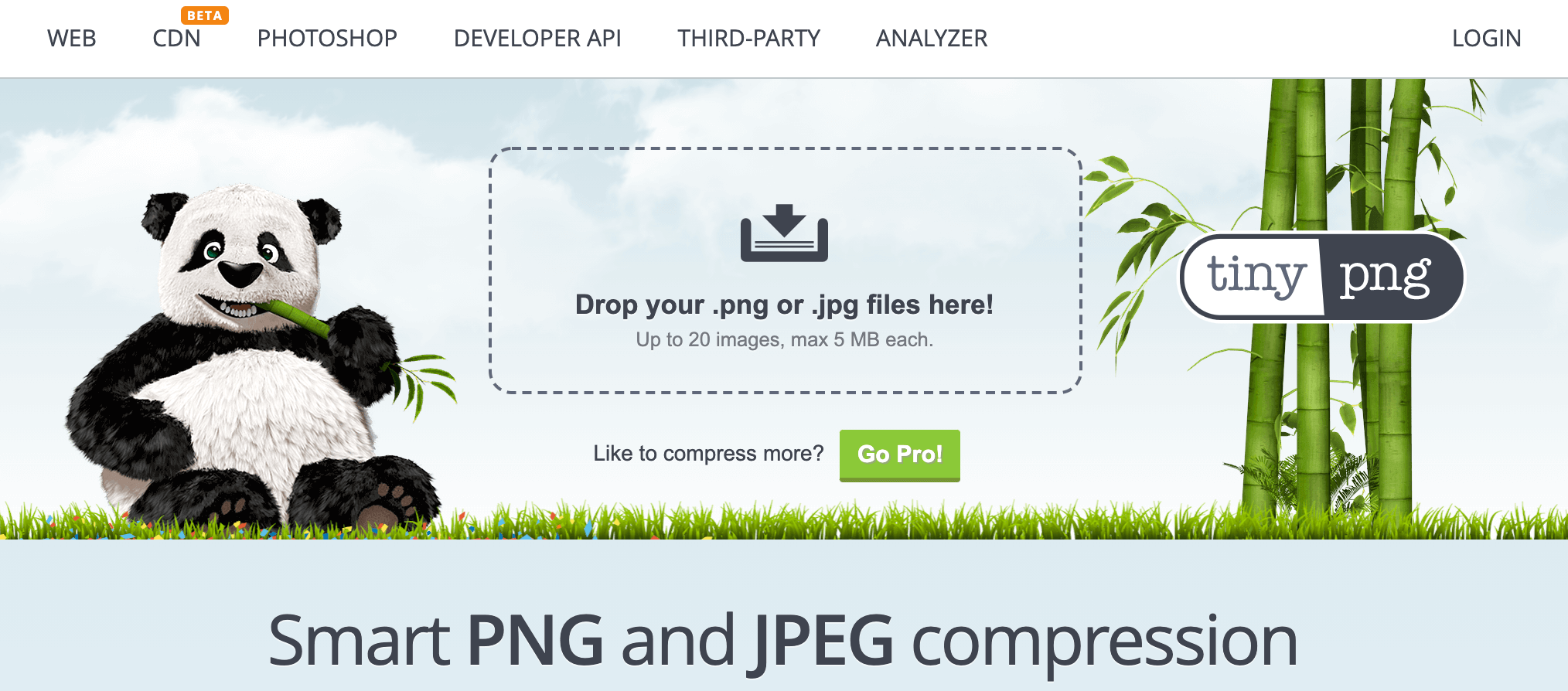
This compression tool not only keeps your image file sizes small, but the compression it uses on your images does not change the overall image quality to an extent that would be noticeable to the average user’s eye.
Category, Product, and Collection Page Optimization
After you have figured out the basic structure of your content, the next step is to optimize your category and product pages. For most e-commerce sites, these two page types will generate the majority of sales for your business, so it’s worth making sure you optimize them correctly.
Optimize Your Title Tags
Page title tags (also known as page titles) offer huge SEO potential based on the direct impact they have on your page’s click-through rate (CTR). These titles inform people and search engines of what the page is all about. You will recognize them as blue clickable titles shown on SERPs.
An optimized title tag is between 50–60 characters long, descriptive, and uses your target keywords within the title itself. Remember to think about search intent. Many e-commerce sites choose to add their company names at the beginning or end of the title tag. Remember that not all of your target audience will be familiar with your brand (at least not yet, that is), so try to avoid using your brand within these titles. A better strategy to gain valuable traffic to your site is to use keyword modifiers to gain a large amount of long-tail traffic on your desired page. A few terms that people use when searching for products on Google include:
- Best
- Review
- Deals
- Cheap
- Free shipping
- Online
So your title tag should be something like this: The Best Stand-Up Desk for Under $500
Write Meta Descriptions That Earn the Click
The description tag for your webpage is the little description found in the metadata for a given page. This tag was very important for increasing your SEO rankings in the past, but it is not as important to Google for ranking your page today. This tag is important in terms of improving your CTR, so it is worth optimizing the best you can.

Your description tag should use similar magnet words, similar to the title tags mentioned above, that attract the user to click on your post. The difference between them is that, with a description tag, you have more room to include longer phrases about what your page contains.
Here are a few examples of phrases you can use in your description tag to get more clicks:
Save X% off ____ this summer.
All of our ____ are on sale now through the holidays.
Get free shipping on all ____ orders when you use coupon xyz at checkout.
Click here to see all our exclusive deals on the best _____.
Here is a great selection of ____ that you are sure to love.
Category and Product Page Content
This is one of the hardest parts to get right for e-commerce SEO. Sure, you want to write high-quality content that captivates your audience, but unlike a lengthy blog post, you need to keep your conversion rates in mind.
Some of the most important on-page SEO tactics to use on your e-commerce pages include content length, keyword density, and latent semantic indexing (LSI) keywords. Let’s break down each of these to uncover the best approach to optimizing your category and product page content.
Content Length
There is no fixed word count. A category page needs a short, useful introduction above or below the product grid that explains the range and helps shoppers choose. A product page needs a unique description that answers the questions customers ask: fit, size, materials, use, shipping and returns. Add more text only when it helps the shopper decide.
Use Search Terms Naturally
Put the main search term in the title tag, H1, URL and first paragraph. After that, write for the shopper. Cover the related words people use for the product, such as materials, sizes and use cases, and avoid repeating the exact phrase. A page that repeats one phrase reads badly and converts worse.
Ecommerce URLs: Short, Readable, and Stable
Building a clear correlation between your URL length and keywords will also help your page rankings. Ranking research indicates that short URLs rank higher than longer URLs targeting the same keyword on Google’s first page due to Google favoring a clear-cut URL. Because of the fact that you run an e-commerce site, your URLs will most likely be longer than those of other content-only related sites.
Your URL will usually include categories and subcategories within the URL itself; for example https://standupdesk.com/category/subcategory/product.html.
This doesn’t mean you want your URLs to exceed 50 characters either. The reason for this is that long URLs confuse Google and dilute the impact of these keywords within your URL. On the subject of using SEO-friendly terms in your URL—you also want to make your URL keyword-rich.
Once a URL ranks, keep it. If you must change it during a redesign or platform move, redirect the old URL to the new one so you keep its rankings and links.
Optimize CTAs on Your Product Pages
Inspire visitors to take action on your site by engaging calls to action (CTAs) that provide benefits for your users. Ahrefs site explorer can help you do exactly that by finding on-page SEO ideas based on the top competitors for your desired keywords.
Internal Links: Linking to High-Priority Pages
One of the benefits of e-commerce SEO is that internal linking has most likely already been done for you. That’s because your site’s navigation usually generates many natural internal links on your site. This type of internal linking is an e-commerce SEO best practice, so if your site isn’t already set up this way, it would be wise to do so. More specifically, you want to internally link authoritative pages to your high-priority product and category pages.
Product Reviews and Ratings
Your online reputation management counts. For e-commerce sites, this means that product reviews are extremely important, as they also count as a ranking signal.
One idea to gain these reviews is to send a follow-up email after a customer has received your product and request a review. Another great way to do this is to create a small pop-up on your site that encourages users to leave a review without too much effort on their part (such as using a simple survey box with preset answers).
Show reviews as text on the product page, not only inside an image or a pop-up, so search engines can read them. Mark up the average rating with structured data so it can appear in search results.
Content That Supports Revenue
Blog content earns rankings for the questions shoppers ask before they are ready to buy, such as how to choose, compare or care for a product. Every article should link to the category or product page that answers the next question. Content that never links to a product brings traffic but few sales.
- Buying guides that link to the matching category page.
- Comparisons of products or materials shoppers weigh against each other.
- How-to and care guides that link to accessories, refills and spare parts.
- FAQ blocks on category pages that answer the questions your support team hears most.
If you also want content to earn money directly, see how to monetize a blog.
Use Video on Product and Category Pages
As an e-commerce site owner, you should already have an understanding of how important your product images are to building your brand’s reputation. Outdated and low-quality images may harm your brand image, so it is important to optimize your images as part of your SEO strategy. Producing how-to video guides and product reviews in video format can also improve your e-commerce site’s SEO.
Now you might be asking yourself, “How will product videos help me improve my SEO rankings?”
This is a common question we get when we talk about producing more video content, and the simple answer to this question is through captivating your audience. Where traffic might scrub through images similar to those who power scroll through their Instagram feed, video, on the other hand, captures users’ attention for longer. Just wait a minute; hear us out on this.
Including video content within your product pages gives your site a boost in time on page, which Google definitely tracks for users of your site. Where a user might skim through your product description, video content will capture this attention for much longer and therefore increase your time on page metric and lower your bounce rate. The bounce rate is calculated based on the time a user spends on your page before leaving the site or moving on to another piece of content on your site. Adding video content not only kills two birds with one stone but also gives your traffic more insight into the product they are researching on your site. This might even give you the extra push to move them from the research stage into the buyers’ mindset, having now seen the real product in more detail.
Backlinks and Off-Site Signals for Ecommerce Sites
Building backlinks to your e-commerce site might not be as straightforward as building links to a content site, for example, but it’s still an important part of optimizing your site to move up in the rankings. One way to discover possible backlink opportunities is to use Ahref’s site explorer to discover which types of websites link to your competitors.
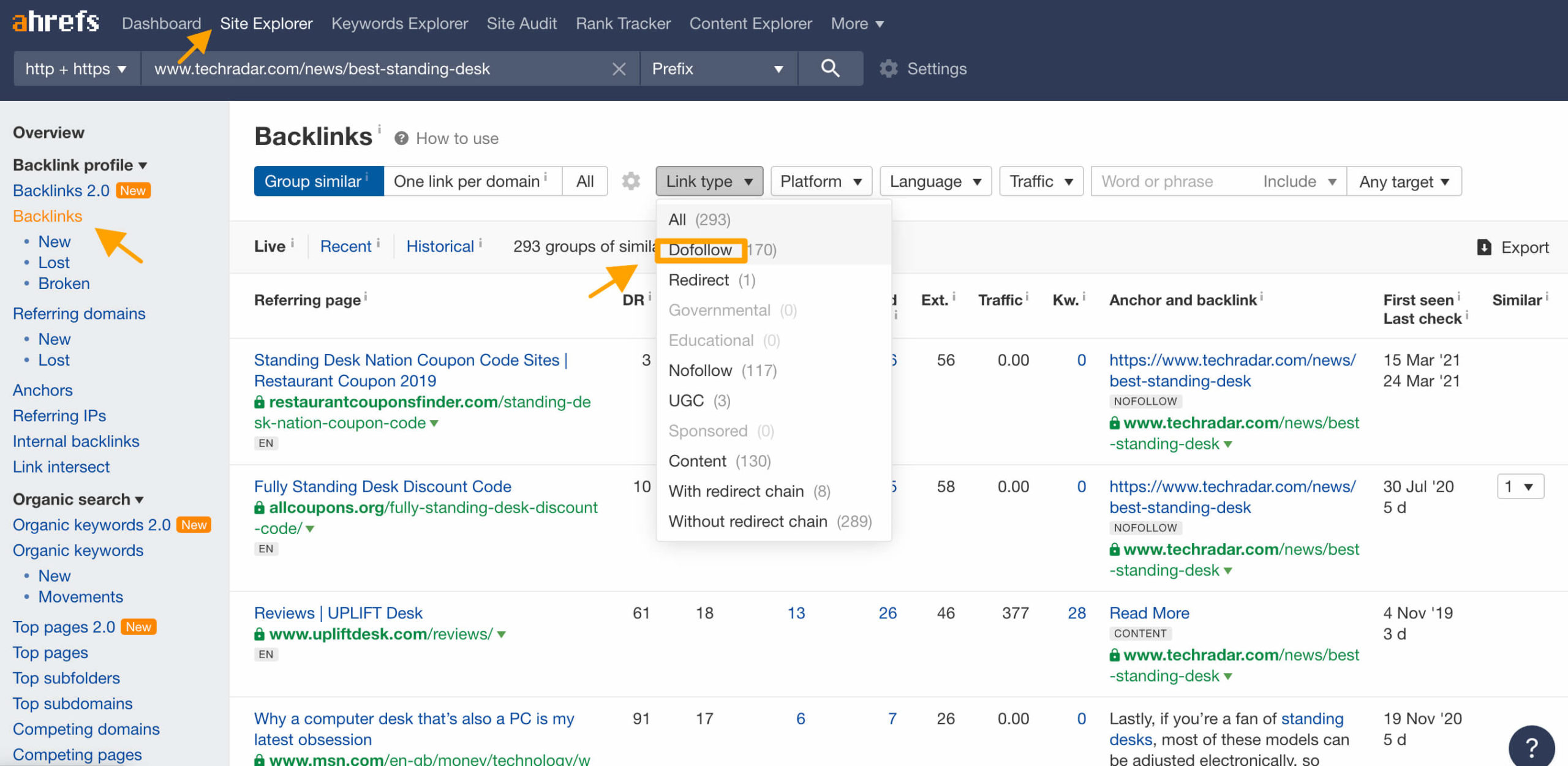
To do this, input your competition’s URL into the site explorer search bar, and click on backlinks. From here, you will navigate over to the link type drop-down menu and select do follow. This gives you a list of referring domains that have been linked to your competitors’ website and set the link to do follow. The reason this link type is important is that you want to generate these types of links to your site, as no follow links will not give you the type of results you are looking for when improving your SEO rankings. The fact that these referring domains have been linked to your competitors’ sites means they might be open to linking to your e-commerce store as well.
Once you have gathered a list of referring domains that have linked to your competitors, begin your outreach to these site owners to ask if they wouldn’t mind linking to your piece of content or post based on the value their audience might gain from it.
Other ways you could gain backlinks to your e-commerce site include guest posts, sponsored posts, and content collaborations. You might not want to reach out to your direct competitors when building content collaborations, but other products and brands within sub-niches on which your product is based are great resources to use when spreading your reach within your given niche.
Avoid paid link schemes and private blog networks. Empire Flippers rejects listings that show signs of fake SEO during vetting, so bought links can cost you a sale as well as your rankings.
Social Media and Brand Searches
One way you can improve your e-commerce SEO outside of what you can optimize on your site is to build a solid social media following. Because Google favors content that is shared across multiple platforms and not just your website content alone, it’s important to build a social media presence to gain authority and recognition for your brand.
The more users share your content with family and friends across various social media platforms, the more Google will recognize your products, thus increasing the likelihood of gaining rank within the SERP. Not only does this provide Google with evidence that your products are trusted by others, but you can also gain referrals and direct traffic this way, which Google also really likes.
Social media is also a great place to discover content ideas and gain insight into your target audience’s thoughts, desires, dreams, and fears. When selling physical products online, it’s not always possible to hang out with your target audience in real life. Social media gives you a platform to add a personal touch to your brand strategy and to build quality relationships with the exact audience you are looking to target. Learning new words and phrases that your potential customers are using is also a great way to discover new content ideas that will attract attention to your e-commerce site.
Local SEO, Only If You Sell Locally
Local SEO only matters if your store also sells from a physical location or serves one area. In that case, claim a Google Business Profile, keep your business name, address and phone number the same on every directory, and ask local customers for reviews. Online-only stores can skip this and spend the time on category pages.
SEO Metrics That Actually Matter
Rankings alone do not pay the bills. Track the numbers that connect search to revenue, and keep them in one monthly report.
- Organic revenue and orders by landing page, from Google Analytics or your store analytics.
- Organic sessions to category and product pages, not only to the blog.
- Conversion rate of organic visitors compared with paid visitors.
- Non-brand clicks and impressions in Google Search Console.
- Indexed pages compared with the category and product pages you want indexed.
- Share of revenue by traffic source, so you can see how much depends on one channel.
Buyers ask for read-only access to these reports during due diligence, so clean tracking now saves time later. To get more revenue from each visit, read our guide to conversion rate optimization, and see how to use your store data to raise its value.
Common Ecommerce SEO Mistakes
- Letting filter and sort URLs get indexed, which creates thousands of near-duplicate pages.
- Copying manufacturer descriptions across hundreds of products.
- Deleting out-of-stock products and leaving broken links behind.
- Publishing blog posts that never link to a product or category.
- Changing URLs in a redesign or platform move without redirecting the old ones.
- Buying links or using private blog networks.
- Relying on one traffic source, whether that is Google or paid ads.
How SEO Impacts Exit Value
SEO also changes what your store is worth when you sell. Empire Flippers lists businesses at 12 months of net profit times a multiple, typically 1.7 to 5 or more, and that multiple depends on factors such as how diversified the business is.
Durable organic traffic helps in three ways:
- It lowers customer acquisition cost, which raises net profit, the number the multiple is applied to.
- It spreads revenue across channels, so the business is less exposed to rising ad prices or one platform.
- It is easy to verify. Buyers ask for read-only access to Google Analytics, Clicky or Shopify analytics and check Search Console for penalties during the standard 14-day due diligence period.
Buyers and our vetting team also look for manipulation. Penalties, deleted accounts or signs of fake SEO can get a listing rejected. Before you sell, read how to sell an ecommerce business, how to value an ecommerce business and the SEO due diligence questions buyers ask.
To see what your store is worth today, use our free valuation tool. It covers 20 business models and takes a minute or two.
Sell your Business Free Valuation
Ecommerce SEO FAQs
What is ecommerce SEO?
Ecommerce SEO is the process of getting an online store’s category, product and content pages to rank in organic search. It covers technical setup, page optimization, content and links. The goal is sales from search traffic you do not pay for per click.
Is SEO still worth it for ecommerce in 2026?
Yes, for most stores. Organic traffic keeps arriving without per-click spend, which lowers customer acquisition cost over time. It also matters when you sell: buyers see steady organic traffic as attractive, because paid ads need constant spend to keep working.
How much does ecommerce SEO cost?
It depends on who does the work and how large the store is. Doing it yourself costs time plus tools, while a freelancer or agency adds a monthly fee. Whatever you spend, measure it against organic revenue, not rankings, so you know whether it pays back.
How do I learn ecommerce SEO as a beginner?
Start with your own store and one checklist. Learn how search engines crawl and index pages, then practice on your category and product pages: title tags, descriptions, internal links and structured data. Google Search Console shows what is working. The technical checklist on this page is a good first pass.
Which ecommerce pages should you optimize first?
Start with category and collection pages, then your best-selling product pages. They match buying searches and carry most of the revenue. Blog content comes next, to support those pages with links and answers.
Is blog content or category SEO more important?
Category SEO usually matters more for revenue, because category pages match shoppers who are ready to buy. Blog content is still useful: it ranks for earlier questions, earns links and should send readers to the right category page.
What are the biggest technical SEO issues for online stores?
The most common are duplicate URLs from filters, variants and sorting, thin or copied product descriptions, slow pages from heavy apps and large images, and broken links from deleted products. Fix crawling and duplicates first, then speed.
How do you get organic traffic to a new store from zero?
Start with long-tail product terms that have low competition, write unique product and category copy, and publish a few buying guides that answer real customer questions. Then earn links through partners, suppliers and press. Organic growth takes months, so keep paid or social traffic running while it builds.
Should an online store rely on SEO or paid ads?
Use both, but do not depend on either one alone. Paid ads bring sales fast but stop when spending stops, while SEO builds more slowly and keeps working. Many stores also grow an email list, a channel they control that is not exposed to algorithm updates or rising ad prices.
What do buyers check about SEO before buying a store?
Buyers check where traffic comes from and whether it is stable. They ask for read-only access to Google Analytics, Clicky or Shopify analytics, review organic traffic over months and years, look at the backlink profile and check Search Console for manual actions. See the full list of SEO due diligence questions.
How does SEO affect the value of an ecommerce business?
Steady organic traffic tends to support a higher valuation because it lowers acquisition cost and spreads risk across channels. Empire Flippers prices listings at 12 months of net profit times a multiple, typically 1.7 to 5 or more, and diversification is one of the factors behind that multiple. Get an estimate with our free valuation tool.
